

Altis v27 is focused on making day-to-day platform management simpler, safer, and more efficient.
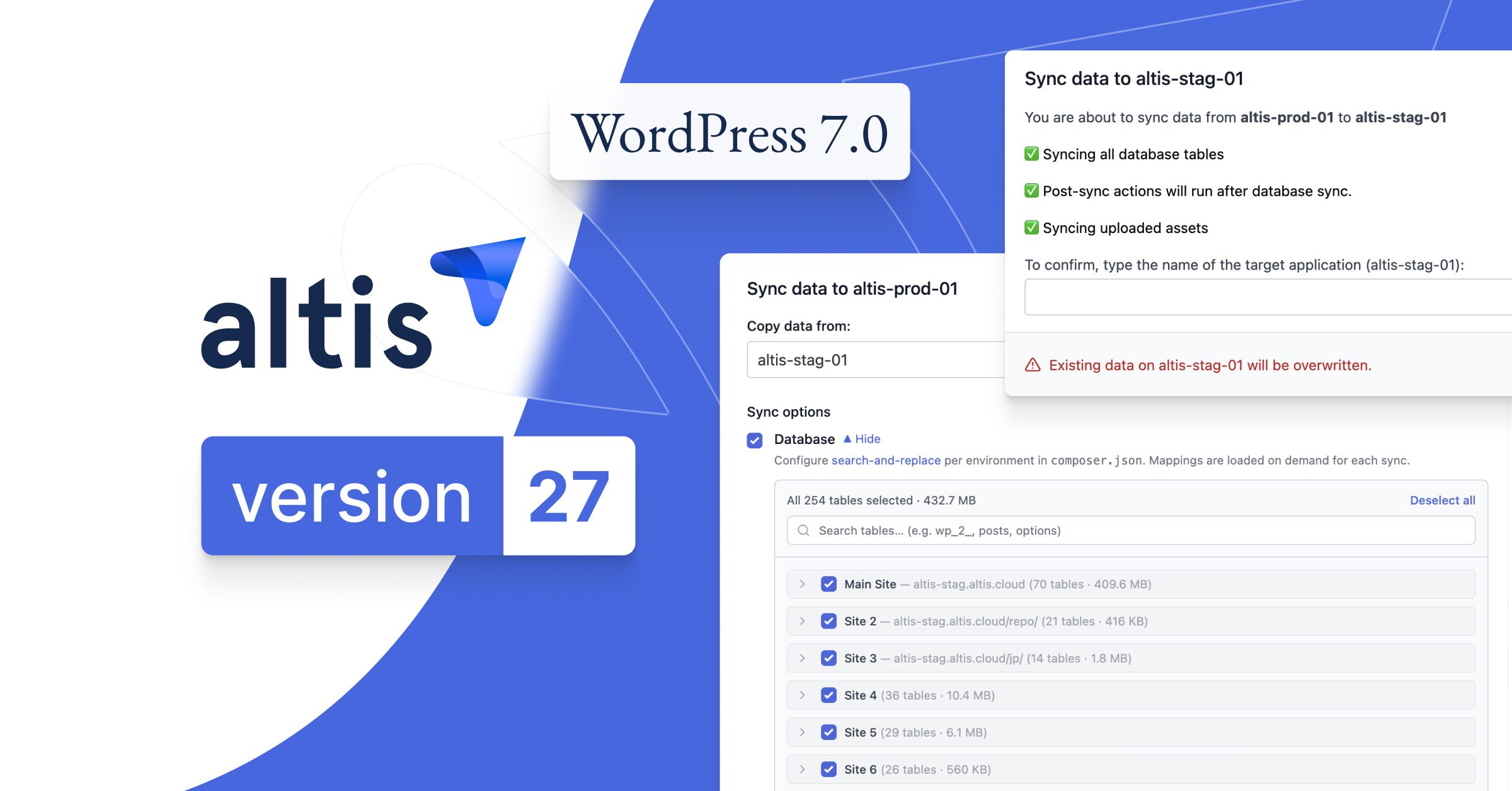
This release introduces Environment Syncing v2, transforming a multi-step process into a streamlined workflow that can copy and prepare environments in a single operation. Altis v27 also adds support for WordPress 7.0, bringing the latest platform improvements from WordPress core to Altis customers, alongside a new GitHub App integration that simplifies repository management while strengthening security.
Together, these updates reduce operational overhead, streamline development workflows, and give teams greater control over how they manage content and infrastructure across Altis.
Here’s what’s new.
Environment Syncing v2: From Multi-Step Process to a Single Workflow
Creating realistic testing and staging environments is a critical part of modern development workflows. It is also often more manual than it should be.
Until now, copying production data into a non-production environment involved multiple separate tasks. Database imports, upload imports, URL replacements, cache flushing, search indexing, and project-specific cleanup tasks all needed to happen in the correct order. While powerful, the process required careful coordination and left room for mistakes.
Environment Syncing v2 brings these steps together into a single workflow.
A sync operation can now automatically:
- Copy databases and uploads from production
- Update URLs for the target environment
- Flush object caches
- Reindex Elasticsearch where available
- Clean up Cavalcade log data
- Run project-specific post-sync tasks
Projects can also hook into the sync process with custom commands, making it easy to anonymize sensitive data, reduce dataset size, update environment-specific settings, or perform other post-sync tasks.
The result is a faster, more reliable way to create realistic non-production environments without the manual overhead.
WordPress 7.0: More Powerful Tools for Developers
Altis v27 includes support for WordPress 7.0, bringing the latest platform improvements from WordPress core to Altis customers.
This release continues WordPress’ investment in modern development workflows, with enhancements across block development, editor extensibility, APIs, and data management. Developers gain greater control over how content experiences are built and customized, while benefiting from improvements designed to make complex editorial interfaces easier to extend and maintain.
WordPress 7.0 also introduces updates to DataViews, expanded support for custom post type templates, improvements to the Interactivity API, and new extensibility points throughout the editor experience. Together, these changes provide a stronger foundation for building tailored publishing workflows and more sophisticated content applications.
The release also includes ongoing performance, accessibility, and developer experience improvements across core, helping teams stay aligned with modern WordPress standards while reducing the complexity of maintaining custom implementations.
As always, WordPress 7.0 support in Altis is fully tested and integrated with the wider platform, ensuring teams can adopt the latest capabilities with confidence.
For more details, explore the WordPress 7.0 Field Guide.
Simpler, More Secure GitHub Integration
We’re also introducing a new way to connect repositories to Altis.
Historically, repository linking relied on a combination of the humanmade-cloud user and AWS integrations. While effective, this approach added complexity to onboarding and repository management while limiting future platform capabilities.
Altis v27 introduces a dedicated GitHub App, providing a simpler and more secure connection model.
Customers can install the Altis Cloud app directly into their GitHub organization and choose exactly which repositories Altis can access. Repository permissions become easier to manage, setup becomes more streamlined, and future platform capabilities can be delivered through a more flexible integration model.
The new GitHub App also creates a clearer self-service experience, allowing teams to manage repository connections directly through the Altis Dashboard.
As part of the rollout, customers will be able to transition from the existing repository connection model to the new GitHub App at their own pace, ensuring a smooth migration path without disrupting existing workflows.
User Agent Blocking
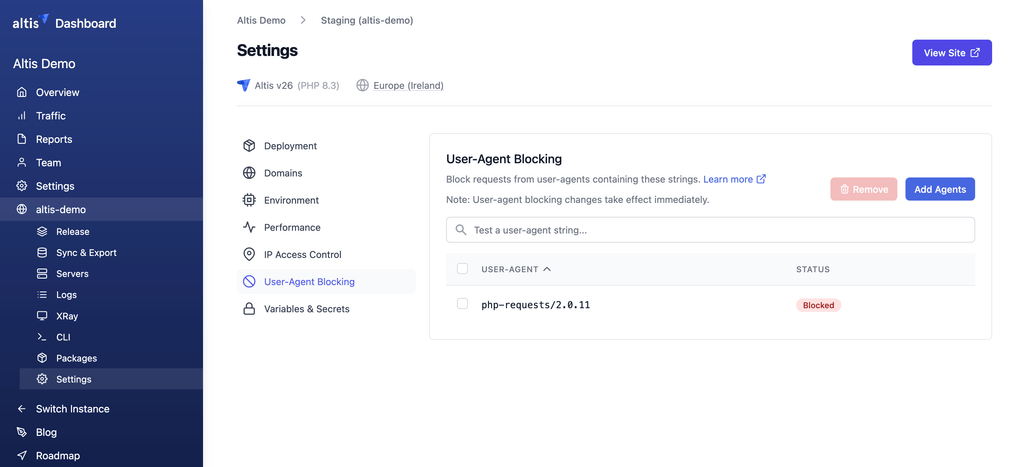
Building on our Advanced Traffic Management add-on, we’ve added a new user-agent blocking feature to the Altis Dashboard, giving teams more control over the traffic reaching their sites.
Our customers can now maintain a list of user-agent strings that should be blocked before requests reach their applications. This provides a simple way to reduce unwanted traffic from known bots, crawlers, monitoring tools, or other automated clients that may be generating unnecessary load or noise.
The feature is managed directly from the Dashboard, making it easy to add, review, and remove blocked user agents as requirements change.
This gives teams a straightforward, self-service tool for managing problematic traffic without requiring infrastructure changes or support intervention.
Platform Improvements Behind the Scenes
Alongside these headline features, Altis v27 includes ongoing improvements across the platform to support security, reliability, and long-term maintainability.
As always, these updates are designed to reduce operational friction while ensuring Altis remains a secure and dependable foundation for enterprise WordPress platforms.
Built for Teams Operating at Scale
Altis v27 focuses on the realities of running complex digital platforms.
Environment Syncing v2 reduces manual effort when managing environments. WordPress 7.0 support keeps teams on the latest generation of WordPress. The new GitHub App simplifies repository management while improving security and flexibility.
Taken together, these improvements help teams spend less time managing operational complexity and more time building and delivering great digital experiences.