

Altis v26 has arrived, and it’s one of our most well-rounded releases yet.
Alongside major performance improvements and the release of Afterburner 1.0, v26 introduces powerful new visibility tools in the Altis Dashboard, including a brand new traffic view and deeper integrations with Advanced Traffic Management. We’ve also delivered meaningful upgrades across WordPress 6.9 support, PHP and MySQL, X-Ray, and Local Server.
This release is about more than raw speed. It’s about clarity, control, and confidence at scale. From understanding exactly who and what is hitting your site, to debugging performance with greater precision, to running on a stronger architectural foundation, Altis v26 strengthens every layer of the platform.
Here’s what’s new.
Understand your traffic in depth in the Altis Dashboard
With version 26, we’re launching a brand new traffic view in the Altis Dashboard, giving you better visibility into your requests. This view provides a quick view of your total HTTP requests and those being blocked by the firewall, as well as an estimate of your page views.
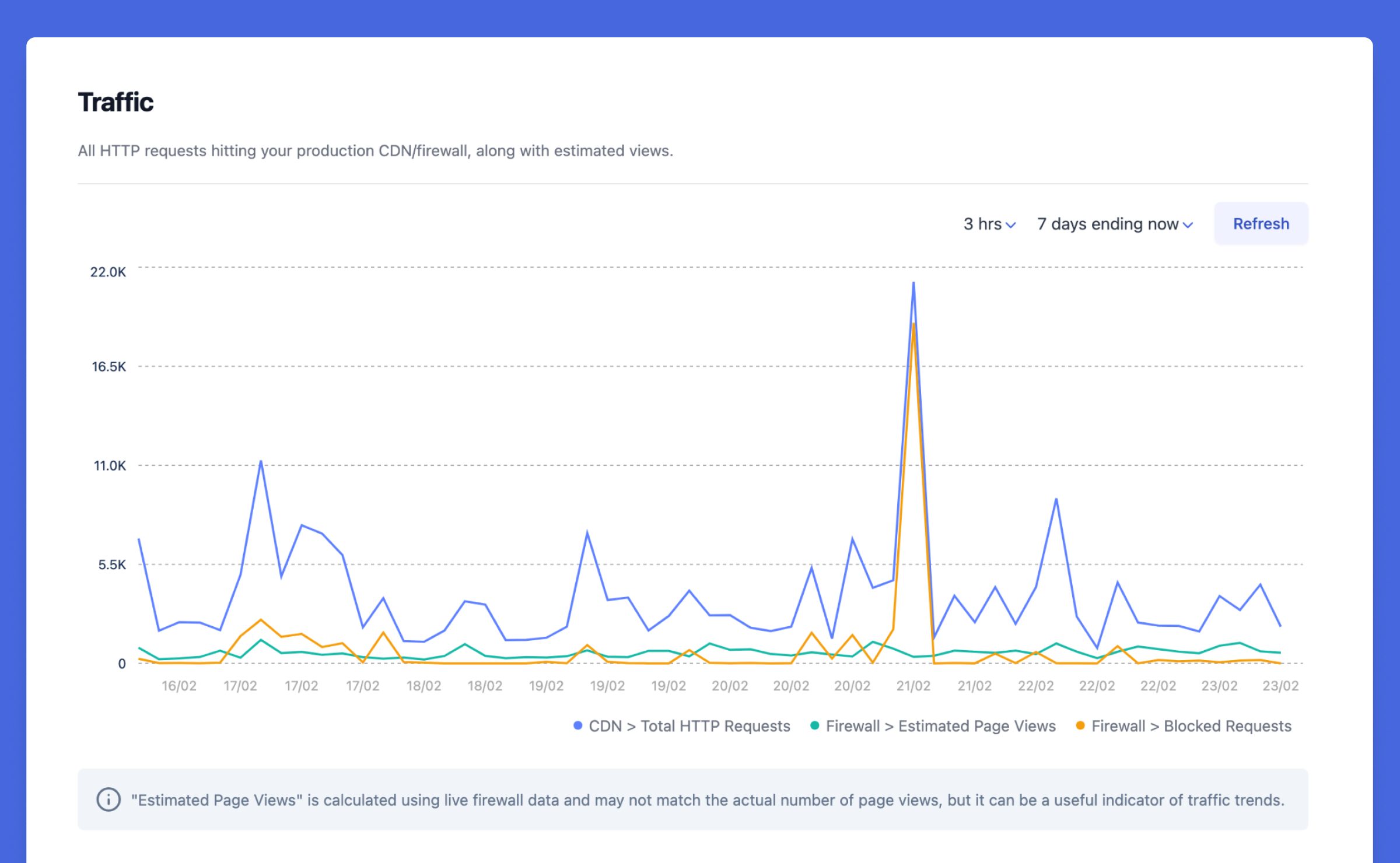
A breakdown of your traffic shows origin device and country, along with details on automated traffic hitting your site. Bots are detected and automatically categorized based on a variety of signals, including origin IP addresses and headers.
The new traffic view is rolling out now for all customers – no upgrade needed!
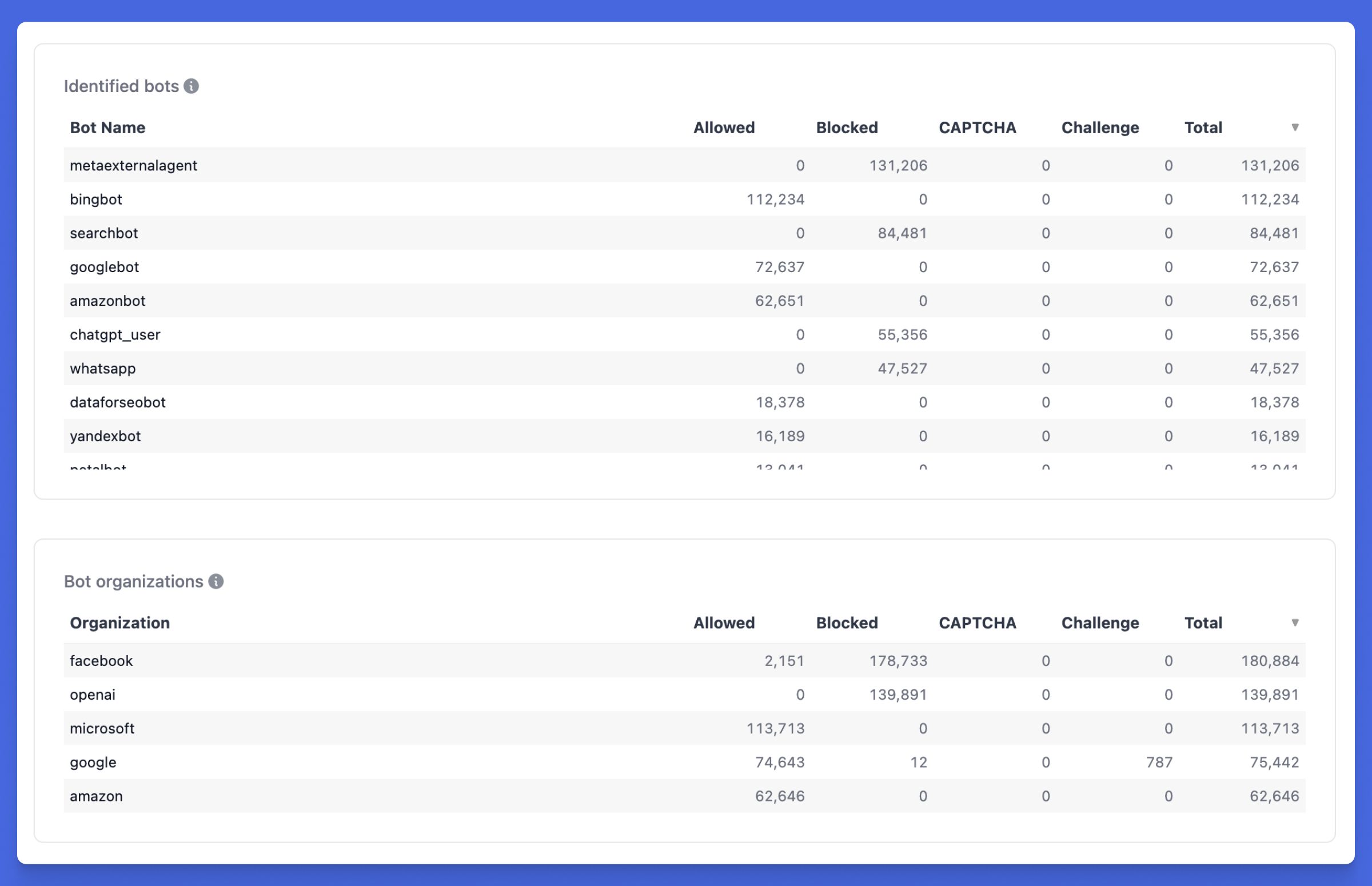
For customers with our new Advanced Traffic Management add-on, the traffic view will show even more detailed data on individual bots and their organization, as well as controls to block this traffic outright or apply automated challenges or CAPTCHAs to it.
Afterburner 1.0: Performant hosting at enterprise scale
In 2023 we introduced Afterburner, a step-change improvement in WordPress performance. Afterburner replaces parts of WordPress with native code, unlocking up to 30% lower response times and a 40% increase in requests-per-second.
Originally introduced as a high-performance enhancement to WordPress’ object caching layer, Afterburner was built to optimize one of the most critical paths in every request: how WordPress reads and writes data from the object cache.
Rather than relying solely on network calls to Redis, Afterburner maintains a local in-memory object cache shared across PHP processes while staying synchronized with the primary Redis store. This significantly reduces cache lookup overhead and improves request efficiency, particularly for high-traffic and complex sites.
As we’ve rolled out Afterburner to customers, we’ve encountered some edge cases with compatibility. Some complex plugins store serialized values in the object cache which use custom Serializable objects. With our original implementation, this could cause a spin lock across multiple threads.
In Altis v26, we’re releasing a major update to Afterburner with our 1.0 release. This iteration moves the serialization step into PHP, improving the balance of performance and ecosystem compatibility.
This unlocks the ability for more customers to use Afterburner and deliver powerful performance at enterprise scale.
Upgrades for PHP and MySQL
Altis v26 raises the platform baseline to align with modern PHP standards.
- PHP 8.3 is now the default version for all new projects
- PHP 8.2 is now the minimum supported version
Adopting newer PHP versions ensures continued security coverage, performance improvements, and compatibility with the evolving WordPress ecosystem. Customers can upgrade their environments any time through the Altis Dashboard via their environment’s settings page.
WordPress 6.9, included in Altis v26, includes beta support for PHP 8.5, with support in Altis Local Server already under development.
We’ve also been working towards updating to MySQL 8.4, with upgrades to production environments coming in the next few weeks. As always, we’ll be communicating with customers prior to their maintenance – you can now quickly check and manage your maintenance contacts in the Altis Dashboard.
Squashing bugs and taking names in the Altis Dashboard
We’ve made a lot of small improvements that add up to a big change to your Altis Dashboard experience.
The pesky bug with axis labelling in our metric graphs is finally gone, ensuring metrics are always readable. We’ve been annoyed by this one for ages, and we know you have been too.
Log URLs now include the full search query to make them easier to share to your team. It’s now easier to filter by type, with clearer checkboxes as well as a “focus” mode to drill down to just one type.
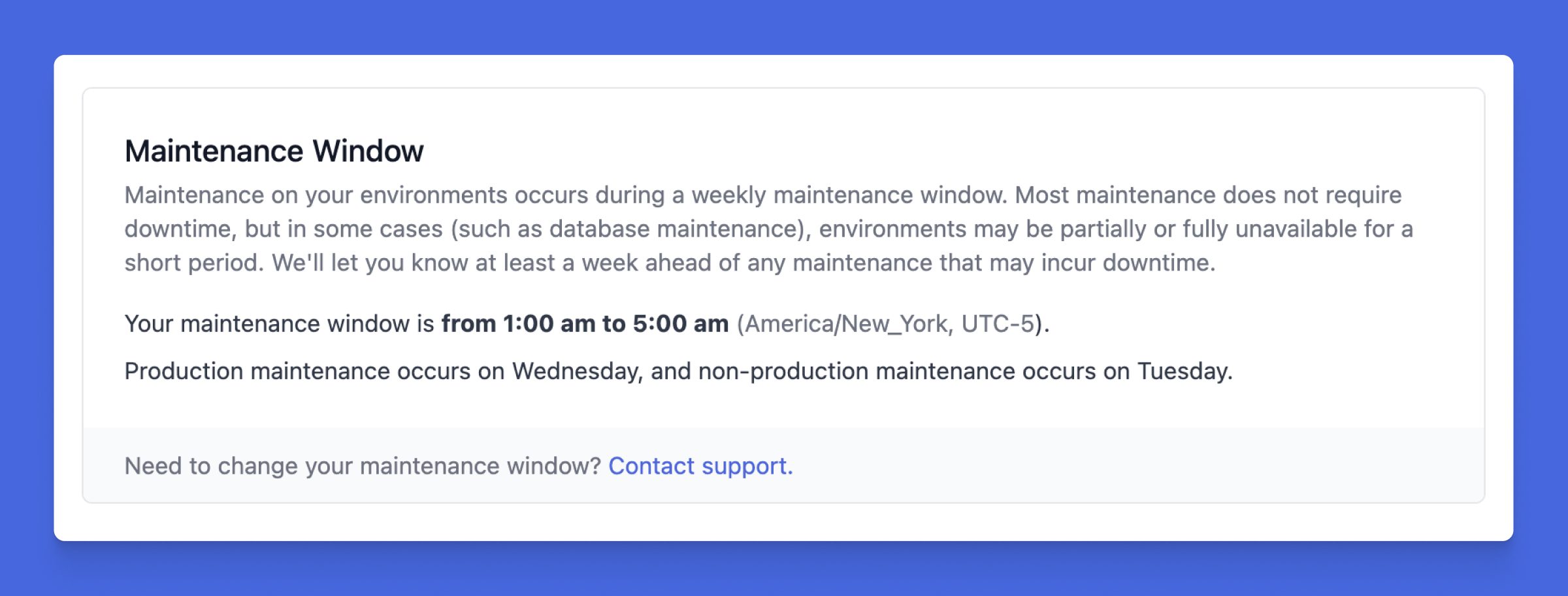
You can now view your weekly maintenance window on your instance Settings page, including the production and non-production days. Plus, you can see and adjust who receives email notifications for maintenance, service updates, and incidents right from this screen.
WordPress 6.9 support: Performance and collaboration evolved
Altis v26 includes support for WordPress 6.9, “Gene”, bringing improvements to collaboration, editing flexibility, and frontend performance.
Notes enable block-level commenting directly within the editor, while the expanded Command Palette streamlines navigation across the dashboard. Together, these enhancements support smoother publishing workflows.
Editor updates include Fit text to container, improved drag-and-drop interactions, and new blocks such as Accordion, Time to Read, and Math, giving teams more layout flexibility without added complexity.
Under the hood, WordPress 6.9 delivers meaningful performance optimisations to script and style loading, reducing overhead and improving responsiveness, particularly for high-traffic environments. Check out WordPress.org for the full release details.
Debug even harder with X-Ray improvements
We’ve launched a great new set of improvements to X-Ray, taking the world’s best debugging tool for WordPress to the next level.
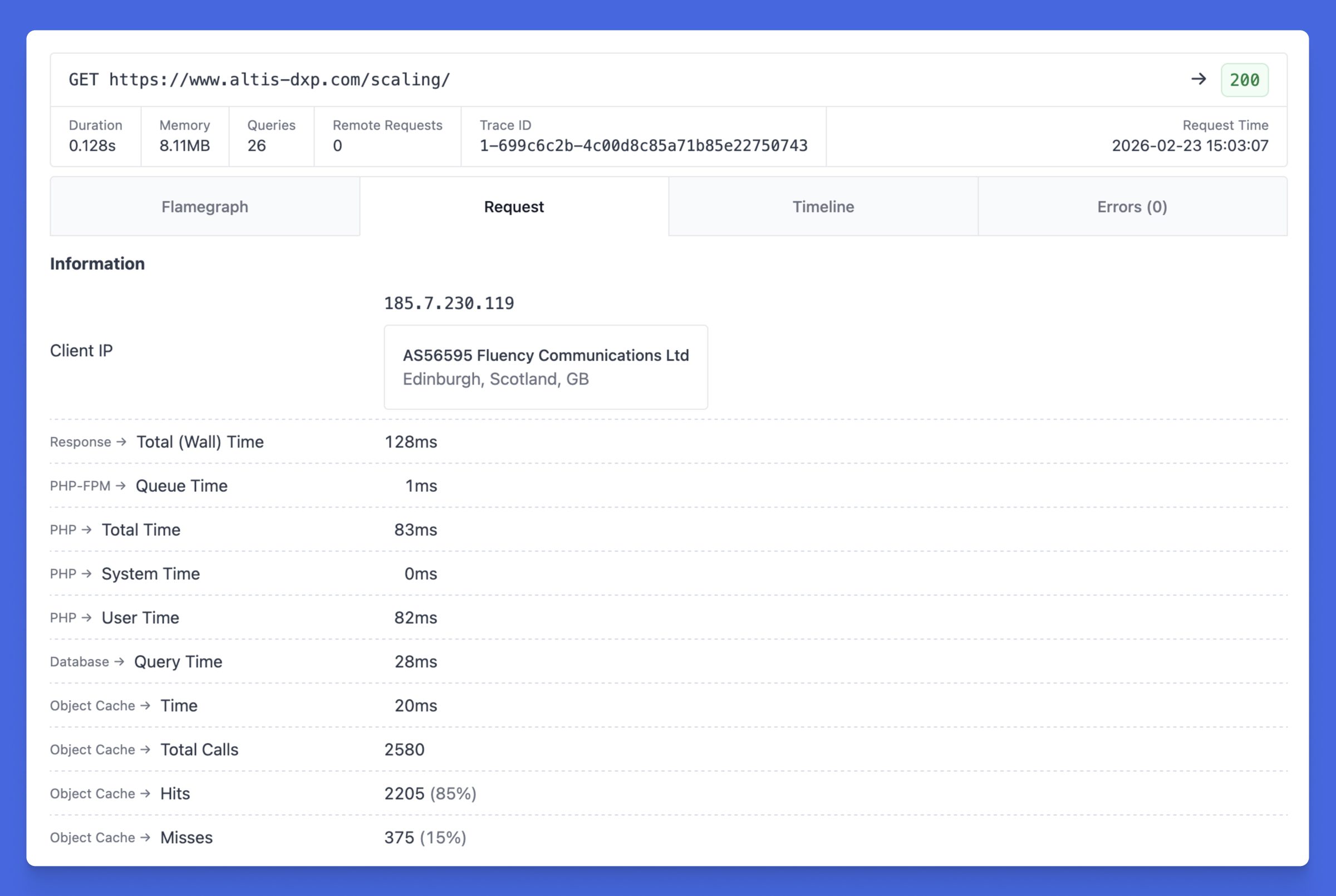
Traces get a makeover, with a clearer overview showing the details you need at a glance, as well as a completely refreshed Request tab with detailed timing information.
Your latest deployments will now show in the X-Ray metrics graphs, making it easy to correlate codebase changes with shifts in your performance.
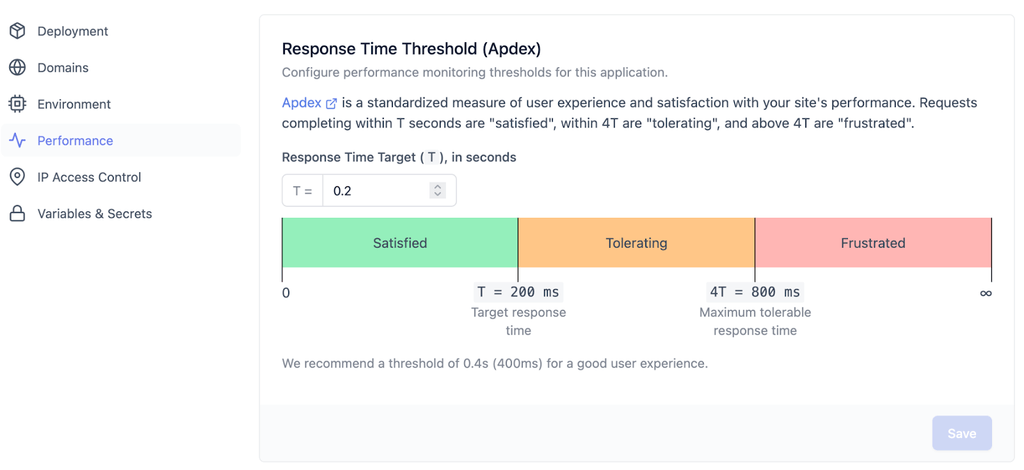
Plus, you can now customize the apdex threshold time (T), allowing you to adjust your performance targets to match your users’ needs.
Altis Local Server: Stability and compatibility upgrades
Your local development experience gets improvements as well, with some under-the-hood changes to improve compatibility and ensure longevity.
Local S3 is now powered by VersityGW
In prior versions of Local Server, uploads were powered by MinIO, an S3-compatible open source object storage database. MinIO has now been discontinued in favour of closed-source options.
We’ve switched across to use VersityGW, a similar S3-compatible open source store. There should be no impact to development workflows in the process, and VersityGW supports all the same capabilities that Altis uses.
Traefik upgraded to version 3
With Docker Desktop v29, older versions of the Docker API used by our Traefik routing container were removed, causing compatibility options. We’d been holding Traefik at an older version to avoid breaking custom Docker containers and configuration, but it’s finally time to rip that bandaid off.
In Altis v26, we’ve upgraded Traefik to v3.
If you have custom Docker containers in your local stack, you may need to update Traefik labels or annotations to align with the new configuration format – note that this is a breaking change.
MySQL upgraded to 8.0.44
MySQL in Local Server has been upgraded to version 8.0.44, a maintenance release focused on reliability and incremental performance improvements, including InnoDB stability enhancements, query optimizer corrections, and updated OpenSSL components on supported platforms.
With our MySQL 8.4 upgrade coming soon, expect to see this version in Local Server imminently too.
Built on stronger foundations
Altis v26 is a release focused on strengthening the platform at every layer.
With WordPress 6.9 support, measurable frontend performance improvements, Afterburner 1.0, a modern PHP baseline, smarter access controls, and upgraded local infrastructure, this release reinforces Altis as a secure, high-performance foundation for ambitious digital platforms.
It’s not just about adding features: it’s about ensuring everything underneath works better, faster, and more reliably for the teams building on it.